


vRealize Automation 8 is out! This is a big release as it marks feature parity with VMware Cloud Automation Service (SaaS offering). In addition, a new architecture which eliminates the need for Windows Server.
For this post, i’ll document what’s needed for an Enterprise Install of vRA8.
High-level diagram:
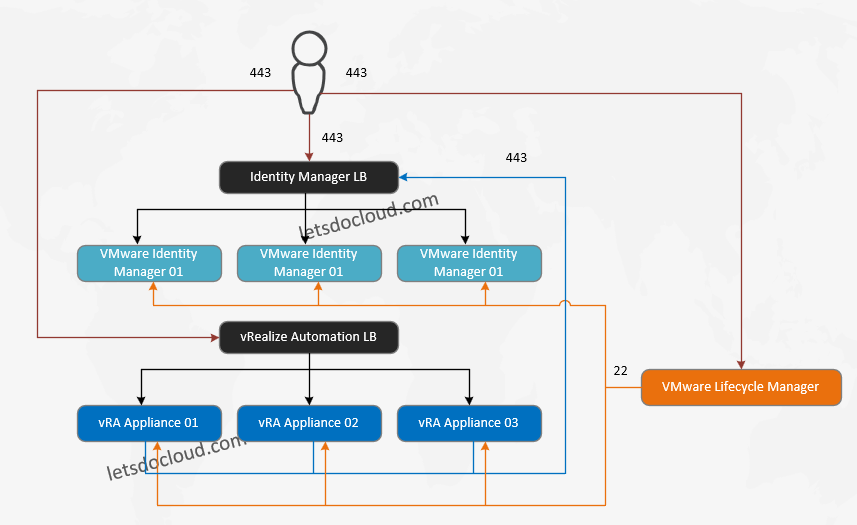
Components:
1 x Lifecycle Manager
3 x Identity Manager
3 x vRealize Automation Appliance
2 x LB to handle IDM and vRA, respectively
High Level Steps:
- Prepare DNS/ FQDN records for all vRA, IDM, LCM, and LB VIP components.
- Pre-create LB-Setup VIP. For vRA, point to only 1 member for now. The other two leave it disabled.
- Launch LCM Installer, install as necessary.
- Supply the LB details for the vRA. For IDM, keep it as single node for now.
- IDM will be scaled via LCM AFTER installation so you only need to setup the LB after the installation.




Bạn có thể xem nhanh tỷ lệ kèo khoảng 15 phút trước khi trận đấu chính thức bắt đầu. Chúng tôi cho phép người chơi so sánh ODDS trước khi vào tiền. Ngoài ra, slot365 còn phát sóng trực tiếp với hơn 4.500+ giải đấu mỗi ngày như: NHA, Primera, Ligue 1, Division, Bundesliga,…
Bạn có thể xem nhanh tỷ lệ kèo khoảng 15 phút trước khi trận đấu chính thức bắt đầu. Chúng tôi cho phép người chơi so sánh ODDS trước khi vào tiền. Ngoài ra, slot365 còn phát sóng trực tiếp với hơn 4.500+ giải đấu mỗi ngày như: NHA, Primera, Ligue 1, Division, Bundesliga,…
Bạn có thể xem nhanh tỷ lệ kèo khoảng 15 phút trước khi trận đấu chính thức bắt đầu. Chúng tôi cho phép người chơi so sánh ODDS trước khi vào tiền. Ngoài ra, slot365 còn phát sóng trực tiếp với hơn 4.500+ giải đấu mỗi ngày như: NHA, Primera, Ligue 1, Division, Bundesliga,…