


It’s been awhile since I posted my revamp home lab. Since then, there have been alot of changes on the setup.
First off, I decided to build another Supermicro machine to act as a “DR” site for my main rig. This is where I simulate replication from my main rig.
The specs of the DR rig:
Supermicro X9SRi-F
1 x Xeon E5-2650L (ES)
128GB RAM
1 x 512GB Samsung 850 PRO
Next, I got a shared storage: Synology DS1815+ to act as NFS target. Also, with the help DSM application, provide internal mail server for sending emails between the different services i’m running.
The build of Synology DS 1815+:
3 x Sandisk Ultra II 480GB SSD in RAID 5
3 x WD RED 3TB in RAID5
2 x S3500 240GB in RAID1 as READ-WRITE cache
Upgraded the box to 16GB memory as well.
I also replaced my layer 2 switch to Cisco 3750G as I needed a brand that is common to customer environment to help with the practice and simulation.
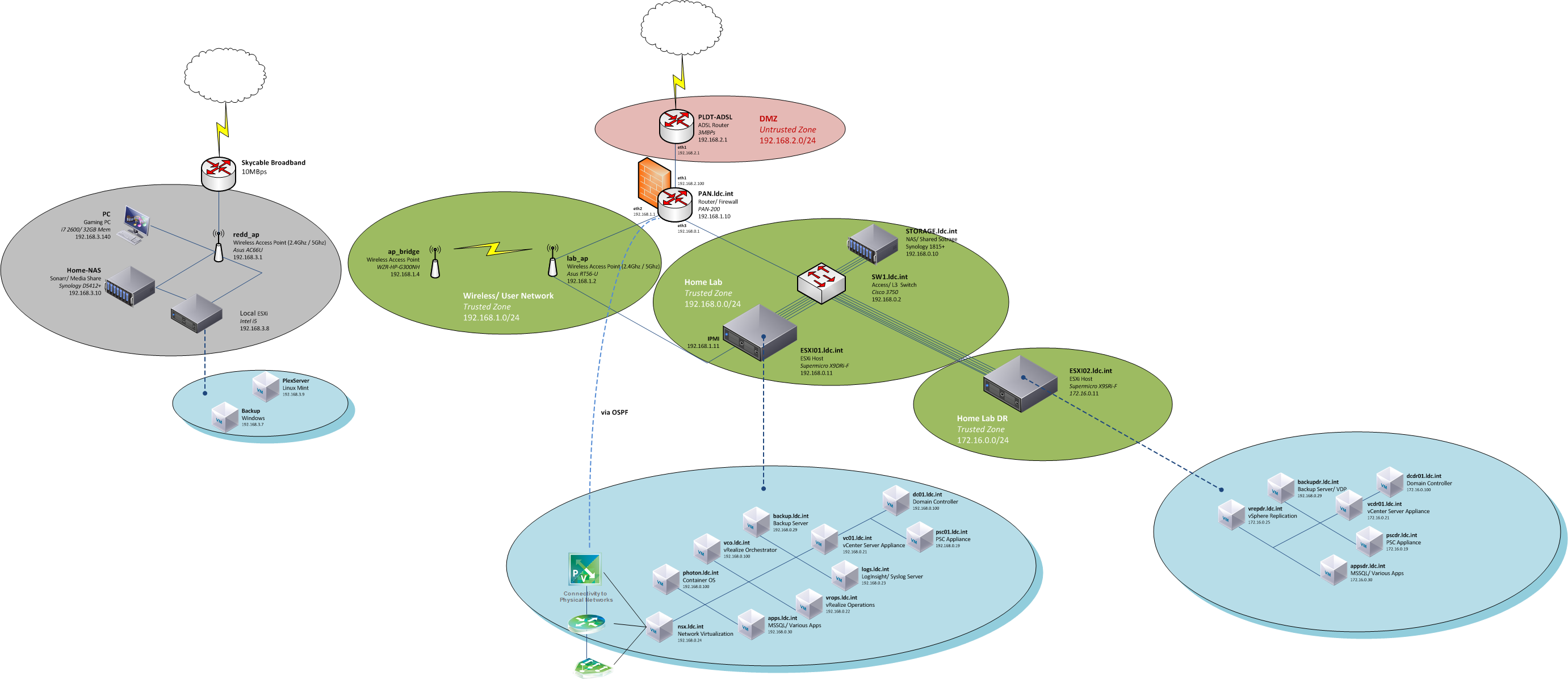
Overall, here’s the network diagram of the whole setup
and thats it.
Thanks for reading!
BONUS: Homelab Progression album: http://imgur.com/a/Ctxzj




Can you be more specific about the content of your article? After reading it, I still have some doubts. Hope you can help me. https://accounts.binance.info/sk/register-person?ref=WKAGBF7Y
Your point of view caught my eye and was very interesting. Thanks. I have a question for you.
Your point of view caught my eye and was very interesting. Thanks. I have a question for you.
Your point of view caught my eye and was very interesting. Thanks. I have a question for you.
extreme muscle growth supplements
References:
skitterphoto.com